
A Modern Manager for Browser Bookmarklets
While often overshadowed by full browser extensions, bookmarklets remain a powerful, privacy-friendly tool for automating repetitive web tasks. However, writing and formatting the necessary JavaScript can be tedious. I recently built a simple bookmarklet manager — using AI to speed up the process — that makes creating, identifying, and sharing these scripts much easier.
What is a bookmarklet?
First, what exactly is a bookmarklet? It's a browser bookmark that runs a small bit of JavaScript code rather than containing a web link. The code will run in the context of your current browser page and can be useful for reading or modifying that content. Bookmarklets need to be formatted a specific way to safely run when clicked.
For example, you might have a simple code snippet that displays a pop-up dialog:
alert('Hello, world!');It needs to be formatted as a single-line function and properly encoded like this:
javascript:(function()%7Balert('Hello%2C%20world!')%3B%7D)()Next you create a browser bookmark using a title like "Hello" and the location set to the formatted bookmarklet code string. Now clicking on the "Hello" bookmark will execute the code you defined. (In this example, a simple pop-up.)
How are bookmarklets useful? Here are a few good ideas I've used myself:
- Copy page link in markdown format (probably my #1).
- Copy selected text as Markdown quote.
- Tweet this (send this link to the Twitter/X interface to share it; similar for LinkedIn or any social network).
- Highlight all links (outlines tags to see what’s clickable).
- Show all images with alt text (flags missing or empty alt attributes).
- Disable all CSS (removes stylesheets to inspect raw HTML).
Here are some more detailed explanations of bookmarklets:
- Introduction to Bookmarklets: JavaScript Everywhere - DEV Community
- Bookmarklet - Wikipedia
- What are Bookmarklets? How to Use JavaScript to Make a Bookmarklet in Chromium and Firefox
An important note about bookmarklets: like browser extensions, they have access to everything in your browser. Don't install anything without reading and understanding the code yourself to make sure it's safe.
Bookmarklet manager
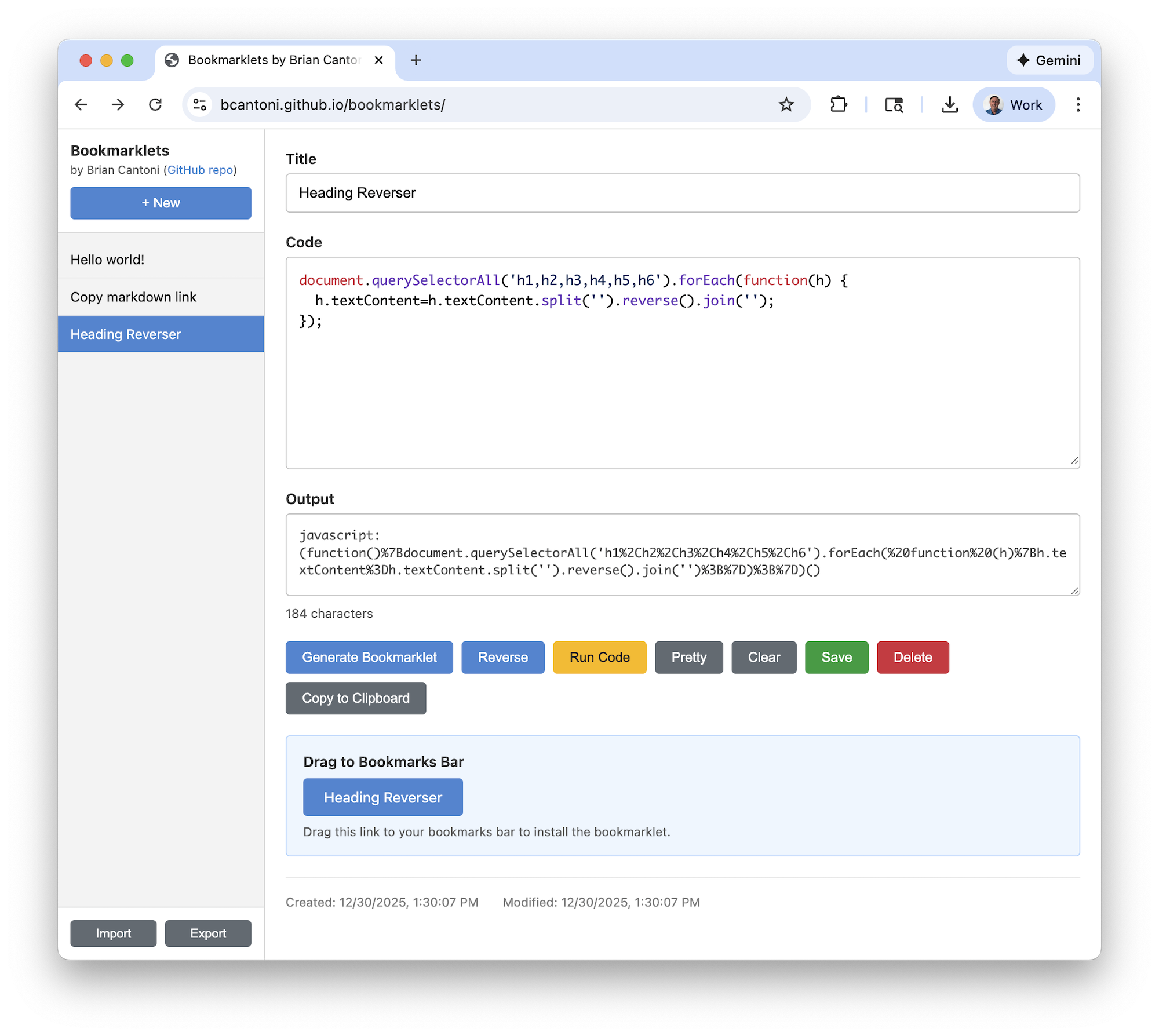
As you can see from the example above, JavaScript needs to be converted into the proper format to be used as a bookmarklet. For anything beyond simple examples, this is kind of a pain. Inspired by some online tools like Bookmarklet Maker, I decided to build my own manager. I wanted a simple editor to convert between plain JavaScript and bookmarklet format, and to save a list of bookmarklets I've made.
Here's the result:
- Live site: https://bcantoni.github.io/bookmarklets/
- GitHub source: https://github.com/bcantoni/bookmarklets
Just like my last project, I used Claude Code (with Opus 4.5) and followed a spec-driven process:
- I wrote the initial SPEC.md with the basic concept and some specific functional requirements I had in mind.
- I prompted Claude to review the spec, give suggestions, clarify the requirements, and update the document.
- I gave Claude the go signal and the initial working version was ready in a couple minutes!
- I tested and iterated on a few tweaks to get to the first release.
I was impressed with the simple UI design that Claude implemented. (I had not given any specifics about the design.) And the solution worked on the first iteration. I suggested using local browser storage but Claude suggested adding the import/export as JSON which is really handy for sharing across multiple computers.
The manager can generate bookmarklets from JavaScript code, load or save them, and provides a drag-and-drop link to easily install them into your browser.
Can AI help you create bookmarklets?
You can probably guess the answer is Yes. AI tools know about browser bookmarklets. You can prompt an AI like Claude or ChatGPT with the details of what you want and then copying and pasting the resulting code into the bookmarklet manager.
Here are a couple examples:
Prompt:
create javascript I could use in a bookmarklet that found all headings
(h1, h2, etc) on a page and reversed the characters in the string
Result:
document.querySelectorAll('h1,h2,h3,h4,h5,h6').forEach(h => {
  h.textContent = h.textContent.split('\').reverse().join('\');
});
Prompt:
create a javascript bookmarklet to copy the web page title and URL and
put them in the clipboard; display a toast near the page top (centered)
for 2 seconds saying \"markdown link copied\"`
Result:
// Build the Markdown link
const markdownLink = `[${document.title}](${location.href})`;

// Copy to clipboard
navigator.clipboard.writeText(markdownLink).then(() => {
  // Create toast element
  const toast = document.createElement('div');
  toast.textContent = 'markdown link copied';

  // Style the toast
  Object.assign(toast.style, {
    position: 'fixed',
    top: '20px',
    left: '50%',
    transform: 'translateX(-50%)',
    padding: '10px 14px',
    background: '#333',
    color: '#fff',
    fontSize: '14px',
    borderRadius: '6px',
    zIndex: 999999,
    boxShadow: '0 2px 6px rgba(0,0,0,.3)',
    opacity: '0',
    transition: 'opacity 0.2s'
  });

  // Add to page
  document.body.appendChild(toast);

  // Fade in
  requestAnimationFrame(() => {
    toast.style.opacity = '1';
  });

  // Fade out after 2 seconds, then remove
  setTimeout(() => {
    toast.style.opacity = '0';
    setTimeout(() => {
      toast.remove();
    }, 200);
  }, 2000);
});
In the future it might be nice to integrate an AI agent into the bookmarklet manager where the result could be dropped directly into the code editor. But for now, a little tabbing back and forth is still pretty easy.